How Albgott is actually built.
The real hardware, network and services, after three years of growing it one piece at a time. Some of it is uneven, and the reasons are more interesting than a tidy diagram would be.
Getting online
The internet arrives through a box I don't control. My contract says the ISP's router stays in the chain, so traffic goes through two routers before it reaches anything I manage: theirs first, then mine.
Mine is a MikroTik hEX S running RouterOS. It does routing, NAT, firewalling and both WireGuard tunnels, and it has no Wi-Fi at all. That part wasn't a plan. I ordered it without checking, missed the return window, and only later realised the accident was a good rule: the box that enforces the firewall shouldn't also be an access point. Wi-Fi comes from an old router from a previous ISP, kept around only for that.
Behind the MikroTik, a TP-Link TL-SG608E managed switch carries tagged 802.1Q trunks to every machine, each one getting only the VLANs it needs. Three boxes doing what a datacenter would do with one, each there for a different reason: one by contract, one on purpose and one by accident.
The machines
None of this was bought for the job it does. The cluster grew out of hardware I already had: a gaming laptop, a retired office desktop and a tower with more headroom than the other two together. Roles were assigned to what existed, and the specs below show it.
Three Proxmox nodes carry almost everything:
| Node | Hardware | RAM / Disk | What it carries |
|---|---|---|---|
| pve01 | Repurposed laptop (Asus GL502VS, GTX 1070 Mobile) | 32 GB · 500 GB SSD + 1 TB HDD | Internal and management proxies, Jenkins, Infisical and dev tools |
| pve02 | Retired office desktop (Dell OptiPlex 7050) | 16 GB · 256 GB | Observability stack |
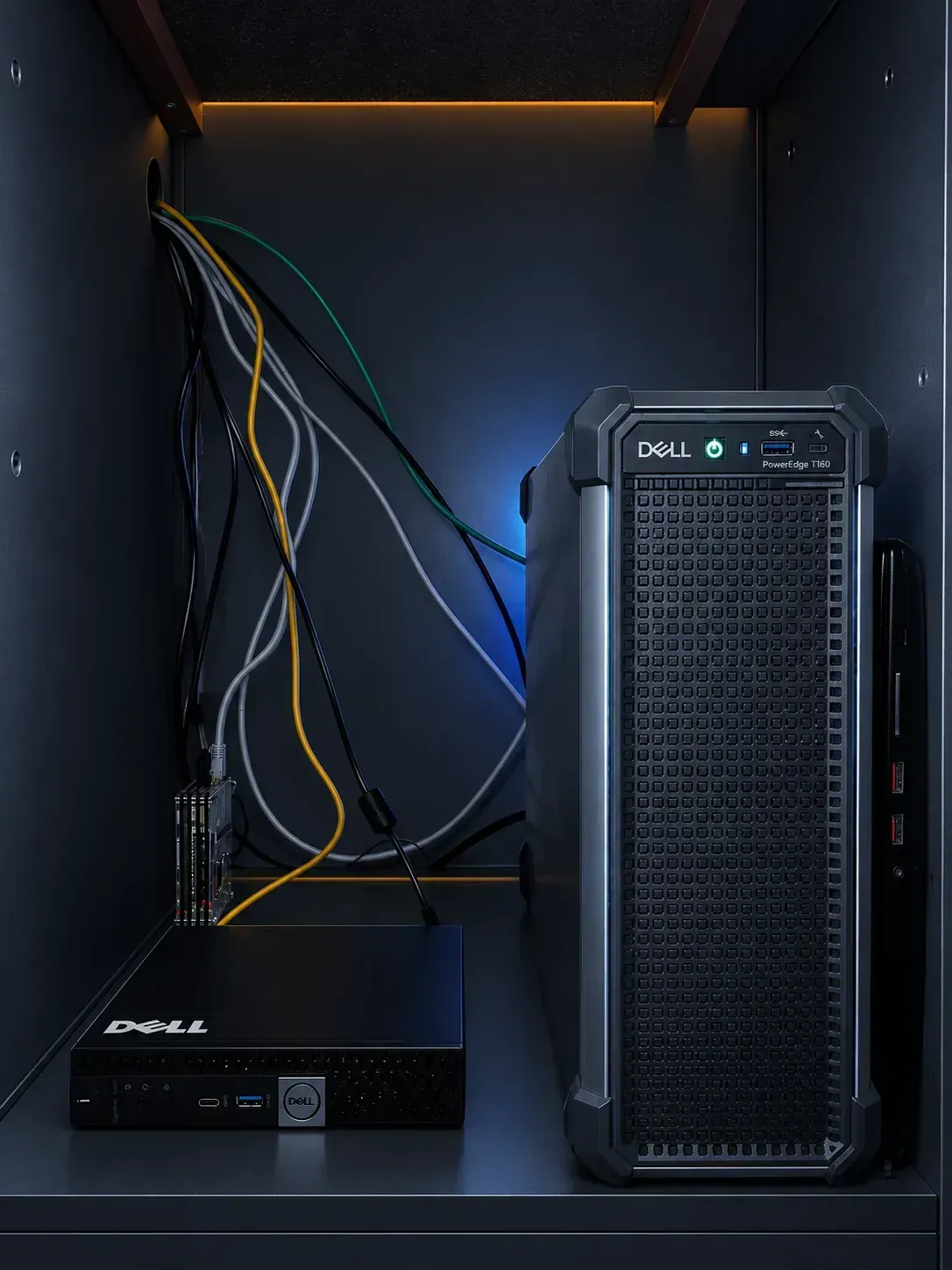
| pve03 | Dell PowerEdge T160 tower | 64 GB · 8 TB single disk | Databases, object storage and public services |
The sizing is uneven on purpose. pve02 runs metrics and dashboards, which want disk I/O more than RAM, so it got the smallest box. pve03 holds the state, so it got the most memory and disk by far. pve01 runs only things that are easy to rebuild: a laptop has no ECC memory, no redundant power, and hinges that were never meant to run 24/7. Its GTX 1070 stays on the host and is shared with LXC containers through device bind-mounts, so an inference server can use it without a VFIO passthrough taking it away from everything else.
The machines have Norse names (odin, brokkr, eitri, thor) because it costs nothing and I like it. In configs, dashboards and alerts I use the boring ones (pve01, pve02, pve03, dns01), because at 3 a.m. "pve03" tells me what it is and "thor" doesn't.
Out-of-band management is uneven too. Only pve03 has a real one: an iDRAC, reachable only through the admin VPN, that can power the machine on even when the OS is dead. For the other two, if one hangs badly enough, the fix is walking over and pressing a button.
There's a fourth machine that isn't a Proxmox node: a Raspberry Pi 3B+ running the primary DNS for the whole network. It's always on and uses almost no power, which is exactly what DNS needs. That's next.
How names resolve
I run two DNS servers because I once ran one. It went down, and a client noticed before I did. Both run Technitium: the primary on the Raspberry Pi, the secondary in a VM on pve03. They answer for albgott.com, and everything else goes to Quad9 over DNS-over-TLS, so lookups for the outside world aren't sent in plain text either.
The pair stays in sync the standard way: the primary sends a NOTIFY, the secondary pulls the zone with AXFR/IXFR, and every transfer is authenticated with TSIG so nobody can inject records. All edits happen on the primary. The secondary only exists so names keep resolving if the Pi dies. Textbook DNS, and I learned why it's in the textbook.
How the network is split
Eight VLANs, each a trust zone enforced on the MikroTik. What a machine can reach depends on which VLAN it's in and on nothing else. Traffic between VLANs is denied by default, and every exception is a rule built from RouterOS address lists: a source list, a destination list and a port.
| Segment | Purpose |
|---|---|
| Home | Personal devices, outside the infrastructure's address space |
| Internal | The application plane, where most services live |
| Data | Databases and object storage, deliberately hard to reach |
| Corp | Work devices |
| CI | Build agents, with outbound access only |
| Public | The DMZ, reachable from the internet only through one proxy |
| Backup | Reserved for a backup system that doesn't exist yet |
| Mgmt | DNS, hypervisor consoles and the rest of the control plane |
The list matters less than the reasons behind it:
- Data is isolated on purpose. Nothing reaches a database or the object store unless a rule names that exact path, and only the few hosts that need it have one.
- Public is a DMZ. It's reachable from the internet, but it can only forward to a short list of backends. It never becomes a path into Internal, even for services running on the same physical machine.
- CI can reach out, but nothing trusts it. Build agents need to pull dependencies and push images. That's a very different permission from administering anything, so they only reach what a deployment needs and nothing in the management plane.
Two WireGuard networks sit next to these VLANs for remote access, one for administration and one for work. They're routed overlays, so a remote device never joins a VLAN; it gets an address the firewall can tell apart from local devices. How access works is on /security.
How traffic gets in
Three Caddy reverse proxies handle incoming traffic, one per trust level. One proxy would be simpler, and that simplicity is exactly the problem.
| Tier | Reachable from | What lives there |
|---|---|---|
| Public | The internet (allow-listed backends only) | The only entry point from the internet. Ports 80 and 443 are forwarded to it, and it forwards to an explicit list of backends and nothing else. |
| Internal | Trusted networks and the work VPN | Tools meant for trusted networks only: dashboards, monitoring UIs, registries, dev utilities. By far the busiest of the three, because it's where the things I use every day live. |
| Management | The admin VPN only | The infrastructure control plane: hypervisor consoles, network gear and hardware management. Reachable only from the admin VPN. |
The rule behind it:
Breaking into an app behind the internal proxy should never give anyone a path to a hypervisor console or a switch.
That's why the management proxy is its own instance, in its own VLAN, behind its own VPN. My rule for anything new: if it can reboot a machine, change the network or touch hardware, it goes behind management. For everything else the only question is the audience: trusted networks or the internet. The same idea shows up on /security, applied to people instead of proxies: it's why remote access is two tunnels instead of one with permission levels.
Two edge cases, because they explain the rule better than the rule does:
- A service can sit behind two proxies on purpose: external integrations such as webhooks come in through the public one, and people use the internal one. Same backend, two audiences, two sets of rules.
- When a device at home opens a public name like albgott.com, the request would hit the WAN address and go nowhere. Hairpin NAT on the MikroTik sends it back to the public proxy, so the same URL works from inside and outside.
Where the state lives
Everything with state (databases and object storage) sits on the Data VLAN, on pve03. Only the hosts, proxies and monitoring checks that need a path in have one.
There are two pieces. RustFS is an S3-compatible object store that replaced MinIO after its licence change and a community UI that got noticeably worse. Because it speaks the same S3 API, nothing built on top had to change. PostgreSQL runs as two separate instances, production and development, instead of one server with two databases, so a bad migration in dev can't touch prod. Both are scraped by postgres_exporter, with alerts for connection saturation, deadlocks, long idle-in-transaction sessions and a low cache-hit ratio.
None of it is backed up yet: it all lives on a single 8 TB disk. That's the first item on the roadmap.
What's running
38 services run on top of all this. DNS, the router, the switch and the three proxies are covered above. Below is everything else, grouped by what it's for, with one line on why each one is here.

The identity provider. SSO with MFA protects the monitoring stack today, and more services are moving behind it one by one.

A second, multi-tenant OIDC provider for public apps that need their own users.

Where secrets are moving to, so they stop living in plaintext config files.





Scrapes every target every 15 seconds and evaluates the alert rules.

Stores the logs Grafana Alloy ships from every host, for 30 days.

Sends alerts to my phone through Telegram, so I hear about problems before a client does.

The dashboards I actually look at every day.

Checks from the outside whether public endpoints answer, independent of Prometheus.

Workflow automation for small glue jobs that don't deserve their own service.

The small dev utilities I'd otherwise be looking for on random websites.

Merging, splitting and converting PDFs without uploading them anywhere.

A UI over the Docker hosts, for when I don't want to SSH in just to check a container.

My own file cloud. It replaced Google Drive, one of the reasons this started.

The photo library I use every day.

A book-tracking app I built myself. Small, but mine end to end.
Day to day, a self-hosted dashboard ties it all together: every internal link in one place, with live stats for each node.
Next: /security covers how access to all of this is controlled, and /operations covers how it's kept running. None of it is finished; /roadmap lists what's still open, in order.